
> Home > Use Cases > By Industry > Multi-site facilities maintenanc

For multi-site facilities maintenance teams

AI call answering for facilities maintenance

Give your coordinators a clear starting point for every maintenance call. Capture the site, affected asset and operational impact, then route the enquiry using your site's contacts and escalation rules.

Keep your existing business number. Assisted setup for facilities helpdesks, maintenance providers and teams managing multiple sites.

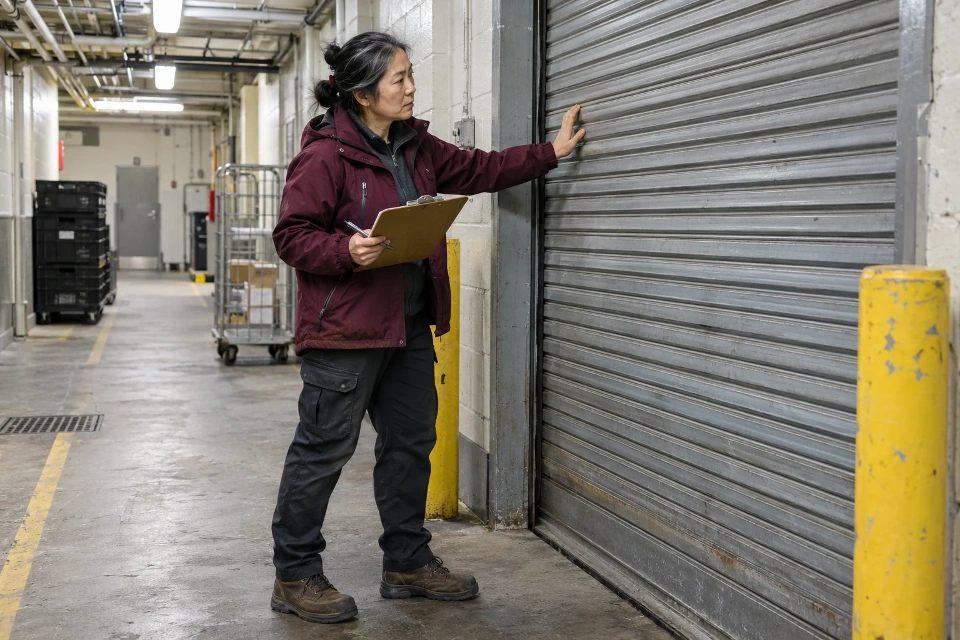
Facilities supervisor checking a roller door

Know which site, what has failed and who needs the call

A branch unable to secure its loading bay needs a different response from a contractor asking to move a planned visit. There247 captures the reason for the call while your coordinators manage trades, schedules and site contacts.

Reactive maintenance and faults

Record the site name and address, exact location within the building, affected equipment and what the caller has observed. Capture any reported disruption, damage or security concern so your team can assess the priority.
Planned maintenance and access changes

Capture the work-order reference, scheduled visit, proposed access window and person meeting the contractor. Flag any reported induction, escort or permit arrangements for the scheduler to check.

Contractor arrival and attendance enquiries

Identify the contractor, company, site and job reference. Record whether they are on site, at the wrong entrance or unable to reach their contact, then follow the site's approved handover.

Existing jobs and repeat faults

Capture the previous reference, what has changed and the current impact. Give the helpdesk enough information to check the existing work order before deciding whether further work is needed.

Call handling that reflects each site's arrangements

A clear site and asset description

Supply site names, branch codes, addresses and commonly used aliases. Agree how to identify a building, floor, tenancy or loading bay. Capture an asset number if the caller already knows it; a useful location and description is better than sending someone to search for a label.

Where you manage different client portfolios, identify the client as well as the site so enquiries reach the correct team.

The right contact and approval route

Provide maintenance categories, current duty contacts and the rules for routine and time-sensitive enquiries. Include known landlord-versus-tenant responsibilities and work-approval contacts where relevant.

Agree how unknown sites, unclear responsibility and unavailable contacts are handled. Your team confirms contract coverage, response commitments and who can authorise work.

Approved site lists and procedures are reference material. They do not give There247 live access to your maintenance management system, work orders, asset history, contractor schedules or building controls.

From a maintenance call to an actionable handover

Illustrative written scenarios, not recordings or customer testimonials. Names, sites, dates and references are fictional. Example messages show the intended information, not a guaranteed delivery format.

A branch cannot secure its loading bay at lock-up

Caller: “We're closing the City branch, but the rear roller door won't come down. We can't secure the loading bay.”

AI assistant: “Can you confirm the site address and which door is affected? Who is on site, and what number can the duty manager reach them on?”

Follow-up: Capture the caller's name, the reported security impact and any existing job reference. Read back the location and callback number, then follow the priority handover without unnecessary extra questions.

Next step: Follow the site's after-hours escalation rules. The duty team decides the response and any contractor attendance.

Example SMS

Priority: City branch, 18 Example Road. Rear loading-bay door will not close; caller says site cannot be secured. Morgan remains on site. Callback number captured. Duty team to contact Morgan.

Example email

Subject: Unable to secure site — City branch loading bay

Site: City branch, 18 Example Road
Asset/location: Rear loading-bay roller door
Reported fault: Door will not close at lock-up
Reported impact: Rear access cannot be secured
Site contact: Morgan, still on site
Contact: Callback number captured and read back

Action: Duty team to assess the response and contact Morgan. No contractor dispatch or attendance time confirmed.

Example warm introduction, when appropriate

“Hi, this is Chloe, your AI assistant. I have Morgan from the City branch at 18 Example Road. They report that the rear loading-bay door will not close and the site cannot be secured. Morgan is still on site. Can I connect you?”

A planned service needs a different access window

Caller: “The air-conditioning contractor is due at eight tomorrow, but our keyholder can't meet them until ten.”

AI assistant: “Which site and work order is this for? What access window can you offer, and who will meet the contractor?”

Follow-up: Confirm the calendar date, original appointment and proposed window in the site's local time. Record any known escort or induction requirements. Make clear that the scheduler still needs to confirm the change.

Next step: Send the request to the facilities scheduler to check with the contractor and site contact. The original appointment has not been changed by the call.

Example SMS

North branch: access-change request for DEMO-641, planned air-conditioning service on 9 Dec at 8 am. Casey offers 10 am–noon; keyholder escort needed. Callback number captured. Scheduler to confirm revised visit.

Example email

Subject: Access change requested — DEMO-641, North branch

Site: North branch, 42 Sample Avenue
Work order: DEMO-641, supplied by caller
Work: Planned air-conditioning service
Original visit: 9 December, 8 am; full date confirmed
Proposed access: 10 am–noon, site local time
Access contact: Casey, keyholder
Reported requirement: Keyholder escort to plant area
Contact: Callback number captured and read back

Action: Check contractor availability and confirm the revised visit with both parties. No schedule or permit approval changed.

A fault returns after a recent contractor visit

Caller: “The contractor came yesterday, but the meeting-room air conditioning has stopped again. It's the same job we reported earlier this week.”

AI assistant: “Which site and meeting room are affected, and do you have the earlier job reference? What is happening now, and is the room still being used?”

Follow-up: Record when the fault returned, the caller's description and the operational impact. If the reference is unavailable, capture the previous visit date and location for the helpdesk to search.

Next step: The helpdesk checks the existing work order and decides the follow-up. The assistant does not assume the job is closed, reopen it or promise a return visit.

Example SMS

Repeat fault: West office, level 2 meeting room. Air conditioning stopped again after yesterday's visit; caller gives DEMO-728. Meetings moved elsewhere. Callback number captured. Helpdesk to check existing job.

Example email

Subject: Repeat fault reported — West office, DEMO-728

Site: West office, 6 Example Lane
Location: Level 2 meeting room
Previous reference: DEMO-728, supplied by caller
Reported history: Contractor attended the previous day; visit date confirmed with caller
Current issue: Air conditioning has stopped again
Operational impact: Meetings moved to another room
Contact: Caller name and callback number captured

Action: Review the existing job and current impact, then contact the site about the next step. No work-order status or contractor ETA verified.

SMS enquiry summaries are included with every plan. Email options and plan inclusion are confirmed during setup. Warm transfers are available on Premium and Business, subject to your routing rules and staff availability. If a transfer is not accepted, the assistant follows your agreed fallback.

Keep technical decisions and work approvals with your team

There247 captures reported symptoms and follows agreed routing. Your authorised team assesses hazards, assigns response priorities, approves expenditure and decides which contractor to engage. A call summary does not create a work order, issue a purchase order or confirm that someone is on the way.

Site staff retain control of access, inductions, permits to work and equipment isolation. Do not place alarm codes, door codes or other restricted access credentials in general caller responses. The assistant does not troubleshoot machinery or certify that an area is safe.

Configure an AI greeting and your approved transcription and summarisation disclosure. Collect only the information needed for the enquiry and agree how immediate safety concerns are handled through the site's emergency arrangements.

Set up around your portfolio and helpdesk

1. Prepare site and contact information

Provide site identifiers, addresses, maintenance categories, public access instructions and approval contacts. Identify who maintains these details and communicates duty-roster changes.

2. Agree coverage and escalation

Choose overflow, after-hours or wider answering. Check forwarding with your phone provider and define the routing and fallback for each site, client or enquiry category.

3. Test the handovers

Test an unsecured site, an access change, a repeat fault and an unknown site. Check the captured location, actual summary delivery and what happens when the duty contact does not accept a transfer.

Questions from facilities maintenance teams

Can different sites have different contacts and escalation rules?

Yes. Agree site-specific information and routing during setup. Include addresses and branch codes to distinguish similar names, plus a fallback when the assistant cannot confidently identify the site.

Can it create or update work orders in our maintenance system?

The current service captures enquiries and sends summaries for your team to action. It does not automatically create, update or close jobs in your computerised maintenance management system (CMMS) or computer-aided facilities management system (CAFM).

Can it confirm a contractor's arrival time or an SLA response?

It can explain approved general service information and record an attendance enquiry. It cannot verify live contractor movements or promise that a service-level agreement has been met. Your helpdesk confirms the applicable priority, attendance and restoration arrangements.

What happens when someone calls about an existing fault?

It captures the existing reference where available, the current symptoms and any changed impact. Your team checks the job history and decides whether to update the existing job or raise further work.

Can it approve access or a contractor's additional work?

No. It can capture the request and route it to the authorised contact. Approval of access, permits, additional scope and expenditure stays with your team.

When does our seven-day free trial start?

The seven days begin once call forwarding is configured and your There247 service is activated. We help configure and test call handling first. No credit card is required to start.

Try it with the calls your sites make

Tell us about your portfolio, recurring maintenance enquiries and duty arrangements. We help configure and test call handling around your sites and the people responsible for each next step.

Your plan, included services, allowances and any usage or phone-provider forwarding charges are confirmed before you subscribe.

Top